Salesforce
Cloud
7 Reasons to Switch to the Salesforce Lightning Interface Today
Article

CK Editorial Team
7
min read

According to Salesforce reports 89% of Fortune 100 companies run AppExchange apps built for Lightning, which quietly tells you that Lightning is no longer just a visual upgrade but the foundation for how Salesforce is implemented at scale.
Where CRM expectations have shifted, speed is now a baseline requirement. Lightning drives this shift, moving teams from static pages to dynamic, component-driven workspaces to resolve complex issues quickly while delivering the personalized experiences modern customers expect.
At its core, Salesforce Lightning combines the Lightning Component Framework, Lightning Design System, and a modern UI to shift Salesforce from static, server-driven pages to dynamic, component-based workspaces that update in place and support role-aware, contextual interaction across CRM workflows.
Navigating the Shift from Classic to Lightning
Salesforce did not build Lightning to simply modernise the look of its interface. As workflows grew more complex, Classic’s limitations of slow pages, rigid customisation, and role-specific limitations became increasingly difficult to manage.
The difference between Salesforce Classic and Lightning becomes clearer when viewed through how each handles navigation, customisation, and interaction rather than just design alone.
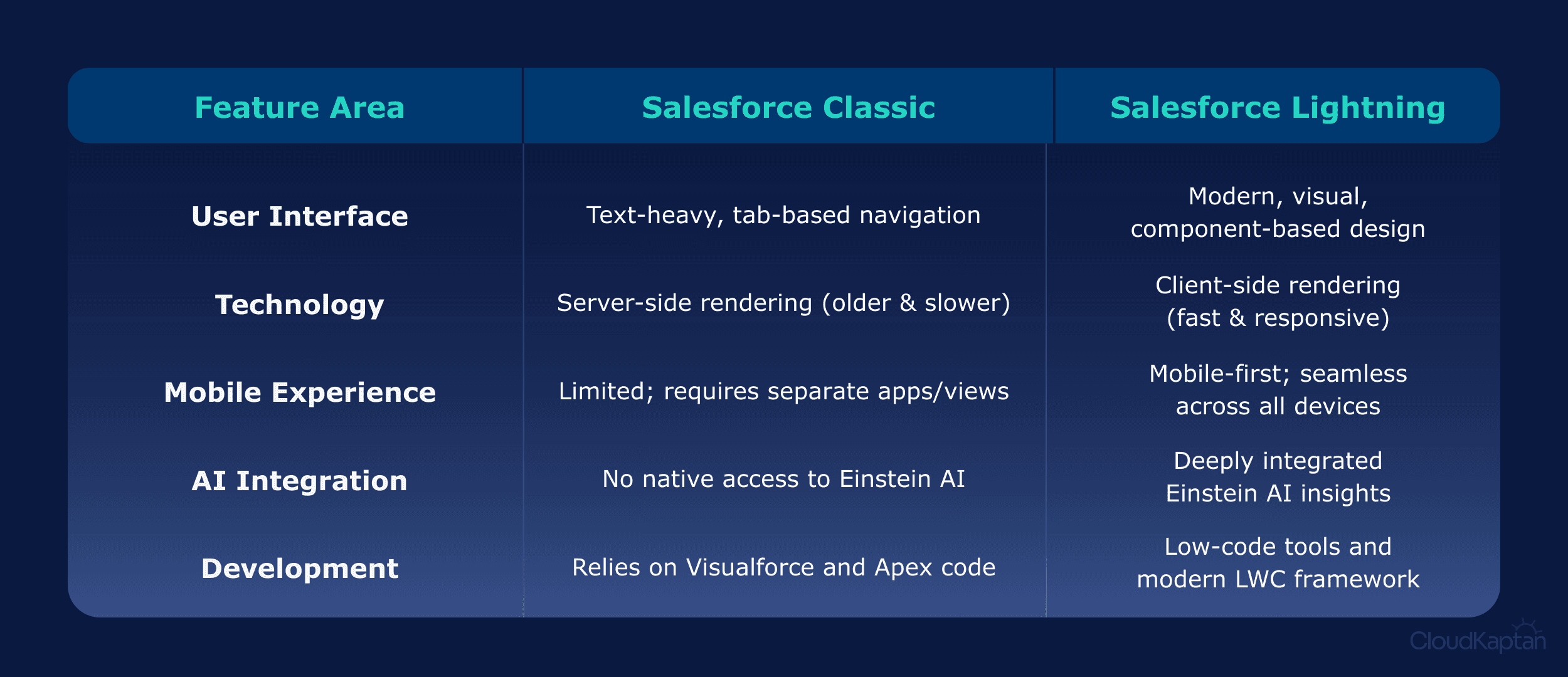
This shift moves logic to the browser, reducing reloads and enabling faster, task-focused navigation that making Salesforce feel more like a workspace than a traditional CRM.
The theoretical value of a modern interface shows up in tangible business metrics, as faster information flow and easier customisation drive collective productivity and proactive growth.
Salesforce says, companies often see a 41% increase in productivity and driven by three value buckets that support different team needs:
For Sales & Service Teams it offers tools like Kanban and Activity Timelines. The visual rise insights instantly, helping team work 25% faster and customers-focused.
For Admins the interface provides a low-code environment with App Builder to create custom pages and automate workflows using drag-and-drop tools.
For Developers Lightning delivers a modern JavaScript framework where Lightning Web Components(LWC) enable secure, high-performance, and reusable solutions.
Inside the Architecture of the Salesforce Lightning Platform
To understand Salesforce Lightning, we need to look at the architecture beneath it. Built on a component-based framework, every button, chart, and list functions independently, allowing interfaces to be assembled from reusable pieces rather than fixed, page-based screens.
Driving this infrastructure is the Lightning Component Framework, which currently supports two models working side-by-side:
Lightning Web Components (LWC) is built on native browser APIs, LWC delivering better performance and cleaner development models using standard HTML, JavaScript, and CSS with a clear separation of template, logic, and styling.
Aura Components are the older, proprietary framework Salesforce introduced before web standards matured. While now legacy, Aura interoperates with LWC, enabling gradual migration, while new development favours LWCs for performance and long-term support.
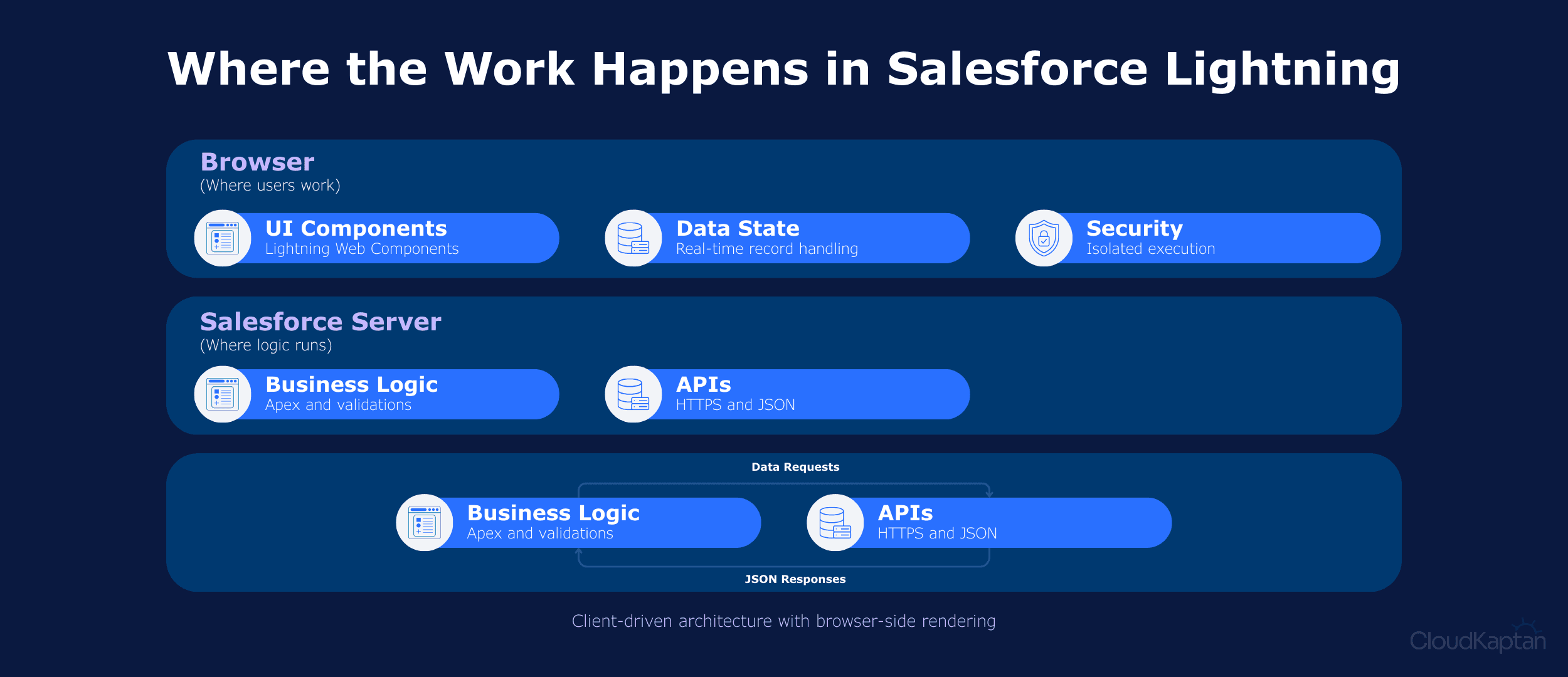
The Lightning experience is built on a layered architecture that shifts work from the server to the browser. With different layers handling rendering, data access, security, and processing to support modern Salesforce applications uses:
UI Layer and Component Framework renders interfaces in the browser using reusable components. Lightning Web Components are the modern standard, while Aura supports backward compatibility and gradual migration.
State Management with Lightning Data Service manages record data through shared browser cache, reducing server calls, enforced security, and synchronising multiple components automatically.
Security Layer with Lightning Web Security isolates components in secure sandboxes, restricting global access and preventing standard, custom, or third-party components from interfering with each other.
Server Logic with Apex handles backend business logic, validations, and integrations, enabling Lightning components to execute complex processing without blocking the user interface.
Communication Protocol Layer uses lightweight HTTPS and JSON data exchange, allowing the browser to render updates dynamically instead of receiving full HTML pages.
To unify these layers, Salesforce introduced Cosmos, the latest Lightning Design System evolution, improving visual consistency, accessibility, and performance while reducing cognitive load and hiding technical complexity behind a clean user experience.
Features that Empower the Modern Workforce
Lightning’s features reflect CRM’s evolution from data entry to continuous, workflow-driven work, translating technical foundations into practical tools that reduce friction and support roles.
Capabilities that Define the Modern Workflow
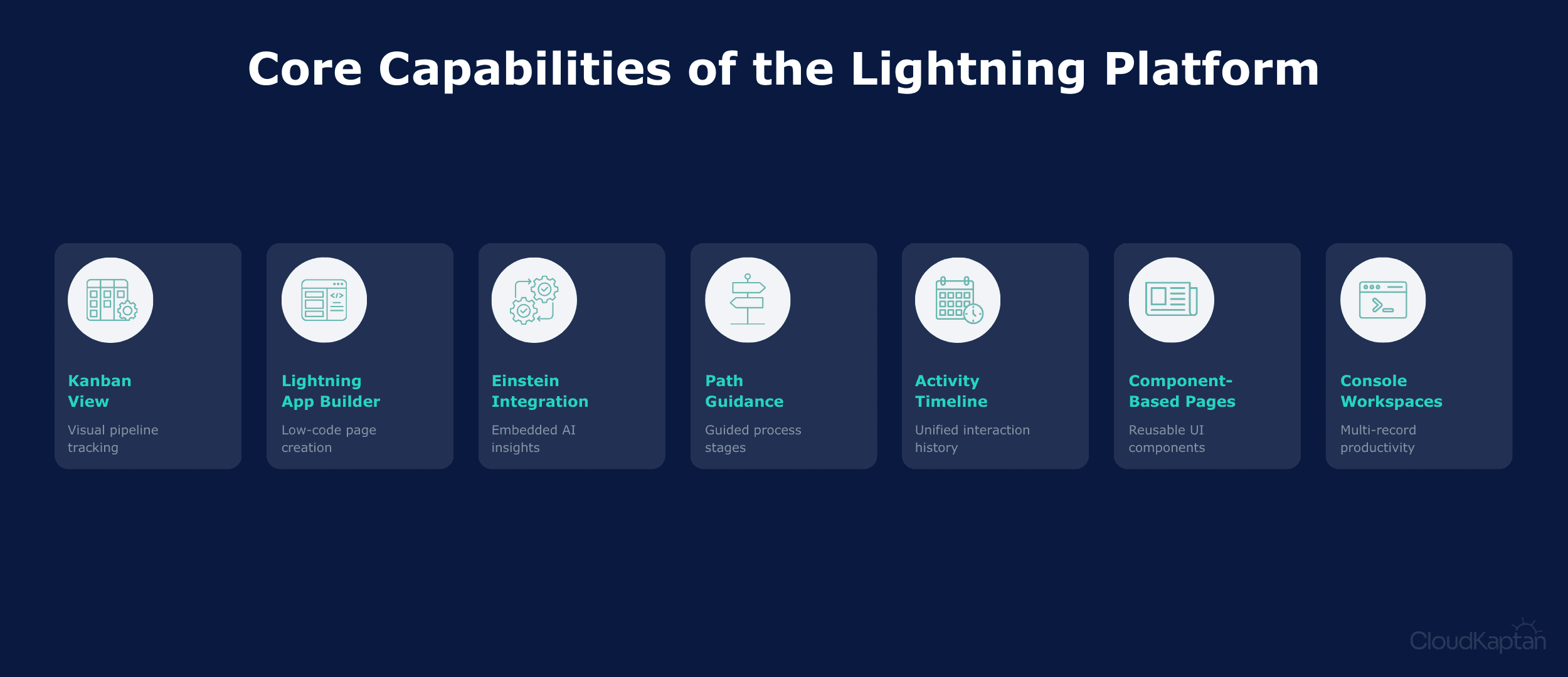
Modern operations rely on robust features. Recent releases highlight key capabilities that drive operational excellence across the entire ecosystem:
Kanban View provides a visual workspace to track records across stages, enabling drag and drop updates that surface pipeline progress and bottlenecks.
Lightning App Builder empowers admins to assemble role specific pages using drag and drop components, reducing custom development while enabling faster iteration.
Einstein Integration embeds native AI into Lightning, delivering predictive insights and automated activity capture that help teams prioritize work and focus on leads.
Path Guidance provides step by step process visibility, highlighting required fields and coaching tips at each stage to promote consistency and user actions.
Activity Timeline consolidates emails, meetings, calls, and tasks into a single chronological view, giving users clearer context across customer interactions.
Component-Based Page layouts allow pages to be assembled from reusable components, enabling role-based customization and faster interface changes without rebuilding entire screens.
Console-Style workspaces provide a unified, multi-record view for sales and service teams, reducing navigation by keeping related data and actions in a single workspace.
Real World Impact with Lightning Platform
These features are not just theoretical improvements but represent fundamental shifts in how industries operate. Across various sectors, organisations are utilising these practical capabilities to solve challenges and drive growth:
L’Oréal utilises the integrated Service Cloud console to provide beauty advisors a 360-degree view, contributing to a $2 billion increase in order value and 15–20% of one brand’s sales via AI recommendations.
Coca-Cola through lightning built custom apps on the Salesforce platform to connect sales, service, and distribution, enabling instant issue visibility and boosting technical service productivity by 30%.
American Red Cross leveraged Salesforce to consolidate data from 150 national partners and 500+ local units, while monitoring 35,000+ concurrent website visitors to coordinate faster disaster relief.
Academy Bank transformed over $3B of its assets using Salesforce’s low-code Lightning Platform to build a Paycheck Protection Program (PPP) loan-tracking app in just 5 hours, allowing it to handle far more loan applications than expected.
Ponce Bank unified its lending and service operations on Salesforce, supporting growth from roughly $1B to $2.5 B that is % assets over four years while scaling staff from 160 to 270 without fragmenting customer operations.
Kotak Mahindra Bank consolidated 12 siloed systems into a single Salesforce platform, enabling faster loan approvals, improved cross-sell execution, and quicker service request resolution across its 43.5 million-customer base.
Implementation Roadmap for Your Move to Lightning
Moving to Lightning works best when treated as controlled shift in workflows and UI, not a simple toggle. Salesforce recommends validating technical readiness and user impact, through an iterative rollout before the one-time switch.
Step-by-Step Implementation
Implementing Lightning is a structured journey. To make a seamless transition, we need to follow these proven phases:
Enable Lightning Experience
In the salesforce setup, assign Lightning Experience User permission. This activates Lightning as controlled access during phased rollouts without forcing to switch immediately.
Grant Lightning Access to Users
Assign the Lightning Experience User permission to selected users. Salesforce recommends using permission sets to manage access rather than modifying profiles directly.
Switch Users to Lightning Experience
Using the Lightning Experience Transition Assistant, switch individual users or groups to Lightning as their default interface. Users can still return to Classic unless restricted.
Control the User Switcher
Admins can allow or remove the option for users to switch back to Classic. Salesforce highlights this as important during phased rollouts and training periods.
Validate User Experience
After switching users, confirm that key workflows, navigation, and customisations behave as expected in Lightning. Salesforce positions this as an explicit checkpoint.
Make Lightning the Standard Experience
Once adoption stabilises, set Lightning as the default interface for all users and optionally remove access to Classic to ensure consistency across the organisation.
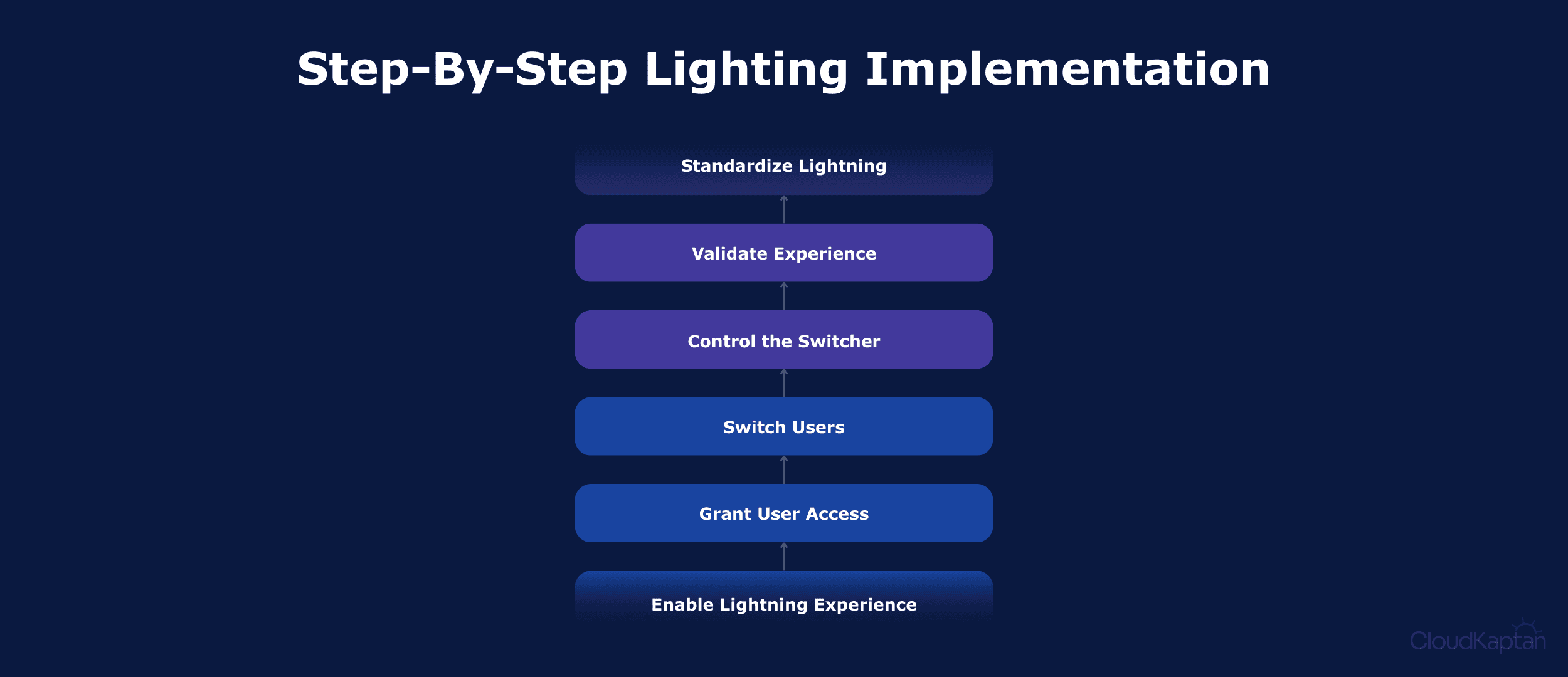
These methods combine official rollout mechanisms with readiness checks. Enabling access incrementally while gathering early feedback avoids common pitfalls and aligns with Salesforce’s recommended transition practices.
Embark on Your Next Generation Journey
Lightning is the definitive future of CRM, serving as the foundation for Salesforce’s AI. By moving beyond the static limitations of the past, your business gains a proactive, intelligent ecosystem built for growth. Its component-based architecture, modern UI patterns, and extensibility reflect how systems can expect to evolve, not as static tools but as adaptable workspaces that grows with business complexity.
For organisations still navigating the shift, we are ready to guide your transition, ensuring you harness the full power of this modern framework.
Ready to see how Lightning can transform your specific business workflows? Contact our team that specialises in seamless migrations to minimise downtime and maximise ROI.
