Salesforce
Salesforce Headless 360: Connecting Context and Execution
Article

CK Editorial Team
6
min read

In TrailblazerDX 2026, Salesforce introduced Headless 360 with a question that captured the shift clearly:
“Why should you ever log into Salesforce again?”
Salesforce Co-Founder Parker Harris asked this question out loud, not as a provocation, but as a signal of where Salesforce is headed.
For 20+ years, Salesforce work has mostly started inside the browser, leading to teams managing interactions and processes manually from salesforce interface. But with Headless 360, humans are no longer the only ones navigating CRM work; agents can now participate too.
Instead of having to keep 10 tabs open and swivel-chair between tools, users can ask an AI assistant to collect, analyse, and trigger next step across approved workflows. Headless 360 is Salesforce’s way of opening its platform capabilities across those surfaces while keeping the trusted core intact. You simply no longer need to stay locked inside one browser window.
What Headless 360 Actually Changes
Headless 360 is not Salesforce without Salesforce. It is Salesforce without the assumption that every action has to begin from the traditional UI.
In simple terms, “headless” means the interface and the backend are separated. The Salesforce backend still holds the customer data, workflows, permissions, business logic, automations, and approved actions. What changes is how those capabilities can be accessed.
Instead of a user always opening Salesforce, searching for a record, clicking through fields, and triggering a workflow manually, an approved agent, app, assistant, or external system can now call the same Salesforce capability from another surface. That surface could be Agentforce, Slack, a mobile app, a customer service channel, a custom portal, or an AI-powered experience. Salesforce still remains the trusted platform core. Headless 360 simply makes that core more accessible to the way modern work is happening.
This matters because CRM work is no longer only screen-led. It is becoming workflow-led. The question is not just “Where is the record?” It is “What needs to happen next, who is allowed to act, and which system should carry that action forward?”
From Clicks in Salesforce to Actions Anywhere
Headless 360 is best understood as a change in access, not a change in the value of Salesforce itself. The platform still holds the customer records, workflows, permissions, and business logic. What changes is how users, agents, and applications can reach and act on that foundation.
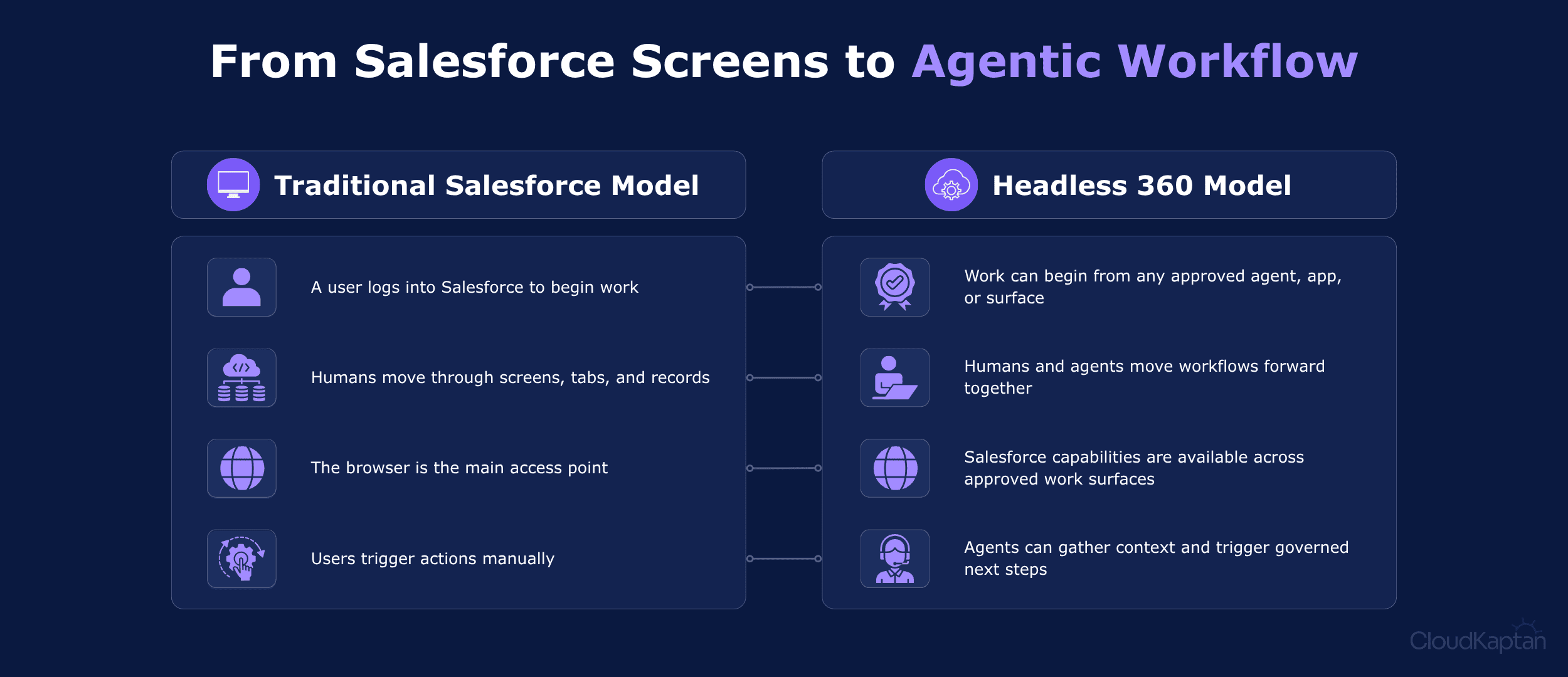
In practice, this means a service manager should not have to move across multiple screens just to understand why a case is delayed. An Agentforce-powered assistant can pull the customer context, check the case status, read the workflow, and surface the next best action inside Slack or another approved workspace.
That is the shift Salesforce Headless 360 is pointing toward: CRM work that starts where the user is, but still runs on the trusted Salesforce core.
The Four Layers Powering Agentic CRM
Headless 360 makes more sense when you look at it as a layered model. Each layer has a different job, but together they explain how Salesforce can support agentic work beyond the browser.
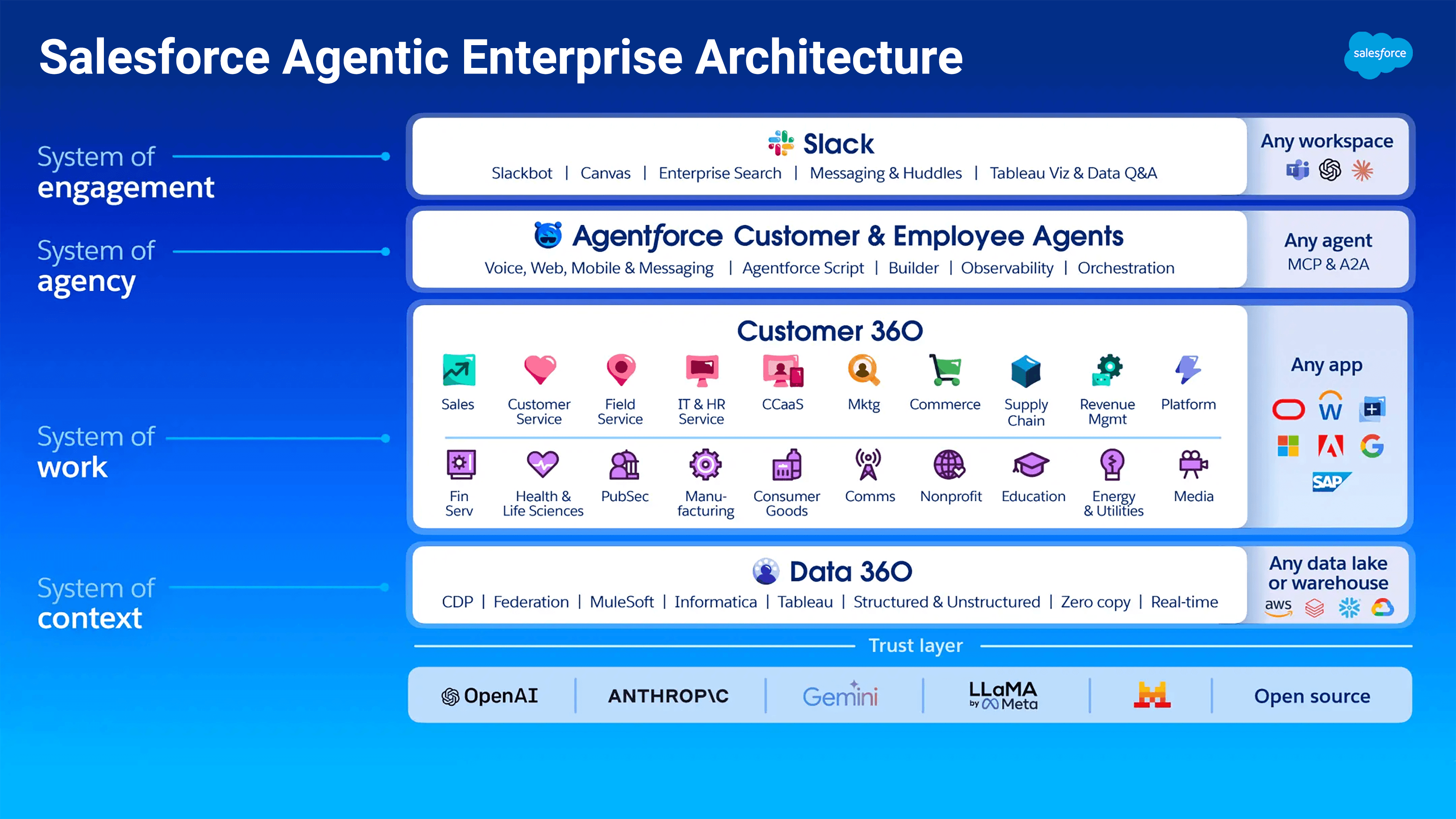
Data 360 as the context layer
Agents need trusted context before they can answer, recommend, or act. Data 360, also known as Data Cloud, brings customer and business data together so agents and applications are not working with incomplete or disconnected information.
Customer 360 as the workflow layer
Customer 360 is where the actual business work lives. It includes the Salesforce records, approvals, service processes, sales motions, automations, and business logic that teams already depend on every day.
Agentforce as the action layer
Agentforce gives businesses a way to build and manage AI agents that can reason, respond, and take approved actions. In the Headless 360 model, these agents are not working separately from Salesforce. They are using Salesforce as the trusted system behind their actions.
Slack as the engagement layer
This is where the work reaches users. Slack is one major surface, but the same idea can extend to mobile apps, voice, WhatsApp, customer service channels, custom applications, and external workspaces.
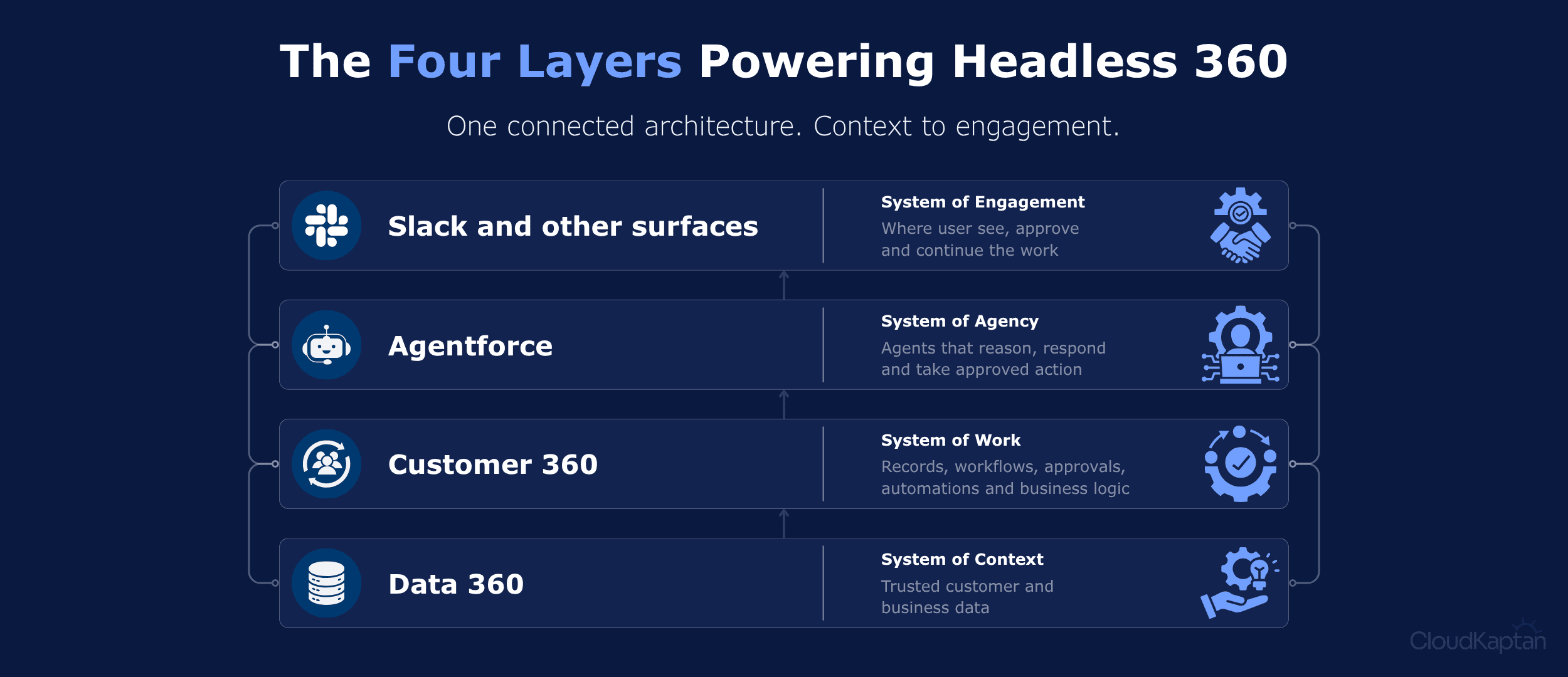
Together, the layers form a simple flow: Data 360 provides context, Customer 360 provides workflows, Agentforce provides agency, and Slack or other surfaces provide the place where work happens, making Headless 360 more than an access model. It helps connect data, workflows, agents, and user experiences into one Salesforce-powered architecture.
The Architecture Behind Agentic Execution
How the Headless 360 Architecture Works
Headless 360 architecture is built around one simple shift: Salesforce capabilities no longer have to be reached only through the Salesforce interface. They can be accessed across external experiences and agents while retaining Salesforce governance and controls. The architecture can be understood through four connected layers.
Experience layer
This layer represents the user-facing surface where Salesforce-powered work is initiated, including Slack, Teams, WhatsApp, voice, ChatGPT, mobile apps, or custom interfaces. Headless 360 brings actions and context closer to those surfaces instead of routing every interaction through the Salesforce UI.
Agent and orchestration layer
This is where Agentforce or another approved agent understands the request and decides what needs to happen next. They can interpret the request, identify the right Salesforce capability, and route the action through governed access instead of operating separately from the platform.
Execution layer
This is the layer that makes the action trustworthy. Salesforce already contains workflows, approvals, business rules, permissions, audit trails, and governance. Headless 360 allows agents and external experiences to use this structure, which separates a trusted Salesforce action from a generic AI response.
Data layer
Data 360, also known as Data Cloud, provides the customer and business context agents need before they act. It connects Salesforce and external data sources so agents can work from a governed view rather than fragmented records or stale snapshots.
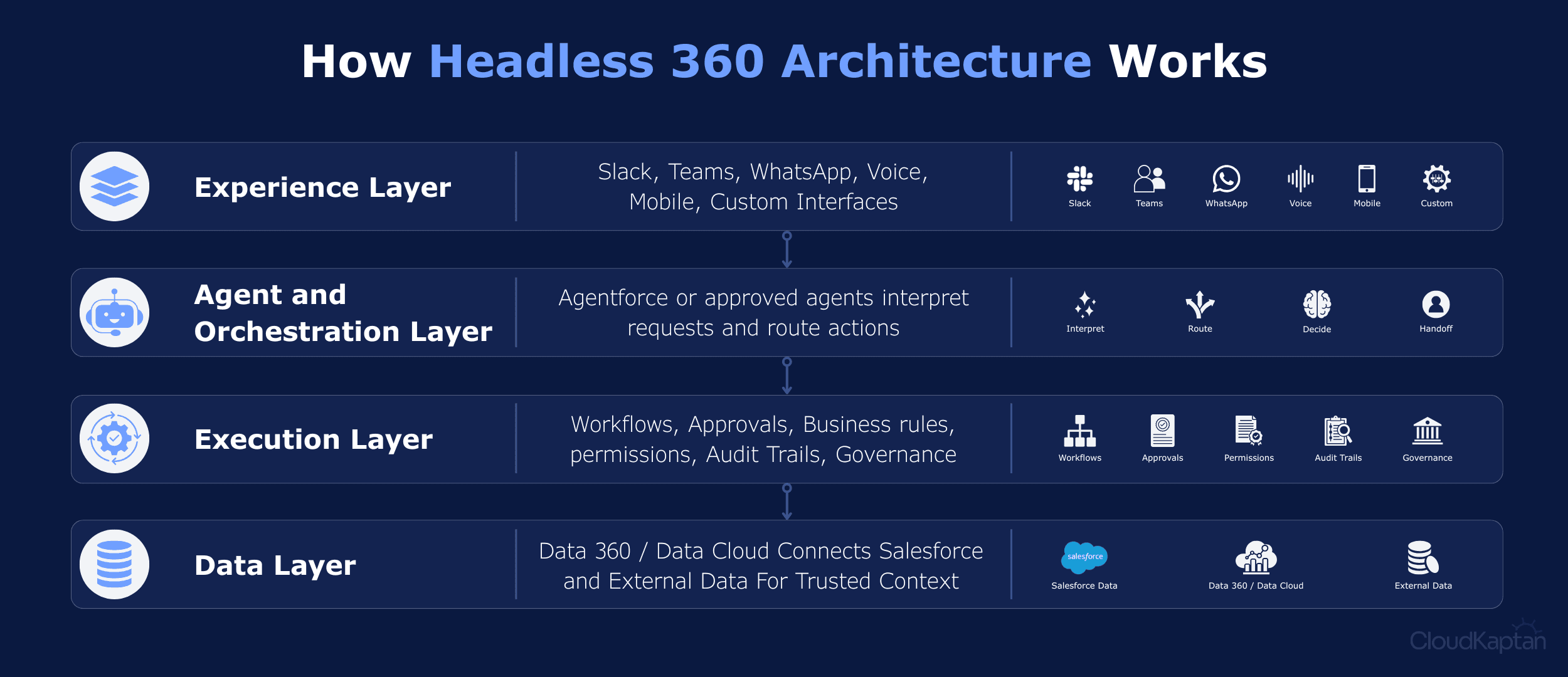
Together, these layers explain the role of Headless 360. The experience can happen anywhere, the agent can decide what action is needed, Salesforce can execute that action through governed workflows, and Data 360 can provide the context behind it.
How Headless 360 Unifies Enterprise Intelligence
Headless 360 becomes more interesting when we start seeing it as the connective layer between Salesforce’s biggest AI investments. Agentforce, Data 360, and Slack are powerful on their own, but the real shift happens when agents can use trusted data, trigger governed workflows, and bring the result back to the user without forcing everything through the browser.
Agentforce gets governed access to act
Agentforce can use Salesforce workflows, business logic, and actions through APIs or MCP tools instead of being limited to what happens inside an agent UI.
Data 360 gives agents the context to decide
Data Cloud brings customer and business signals together so agents can understand account status, service history, renewal risk, or open issues before acting.
Slack and other surfaces bring the action to the user
Once the agent completes or recommends an action, the result can surface where people already work, such as Slack, mobile, service channels, or custom apps.
This is where, Salesforce is no longer remains just where CRM work is recorded. It becomes the governed layer where context, decisions, and actions come together across every agentic experience.
Implementation Readiness Before the Agent Acts
Headless 360 becomes useful only when the right Salesforce workflows are ready to work beyond the traditional interface. A good starting point is a process where agentic access can reduce manual effort, improve context, or move the next step closer to the user.
That could be case escalation, lead follow-up, document collection, approval routing, or service triage. From there, teams need to map what the agent or external experience should do. This also matters for what data it can read, which workflow it can trigger, what requires human approval, and where the experience should surface.
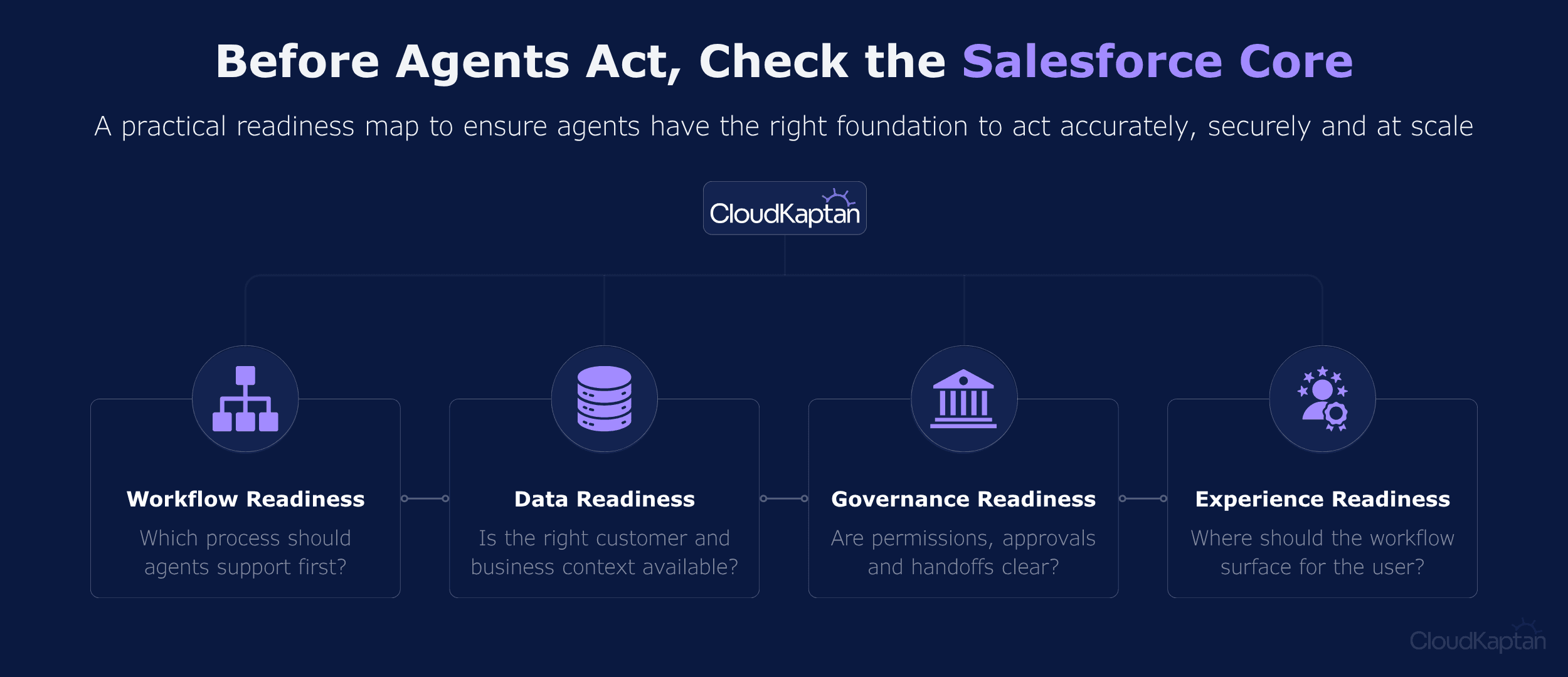
This is where implementation planning matters. As a Salesforce Summit Partner, we help teams move from Headless 360 awareness to practical execution. Whether you need workflow design, architecture, Data readiness, Agentforce adoption, or production governance, we can help turn Headless 360 into a Salesforce strategy that fits you and your business goals.
Connect with our Salesforce expert today!
